
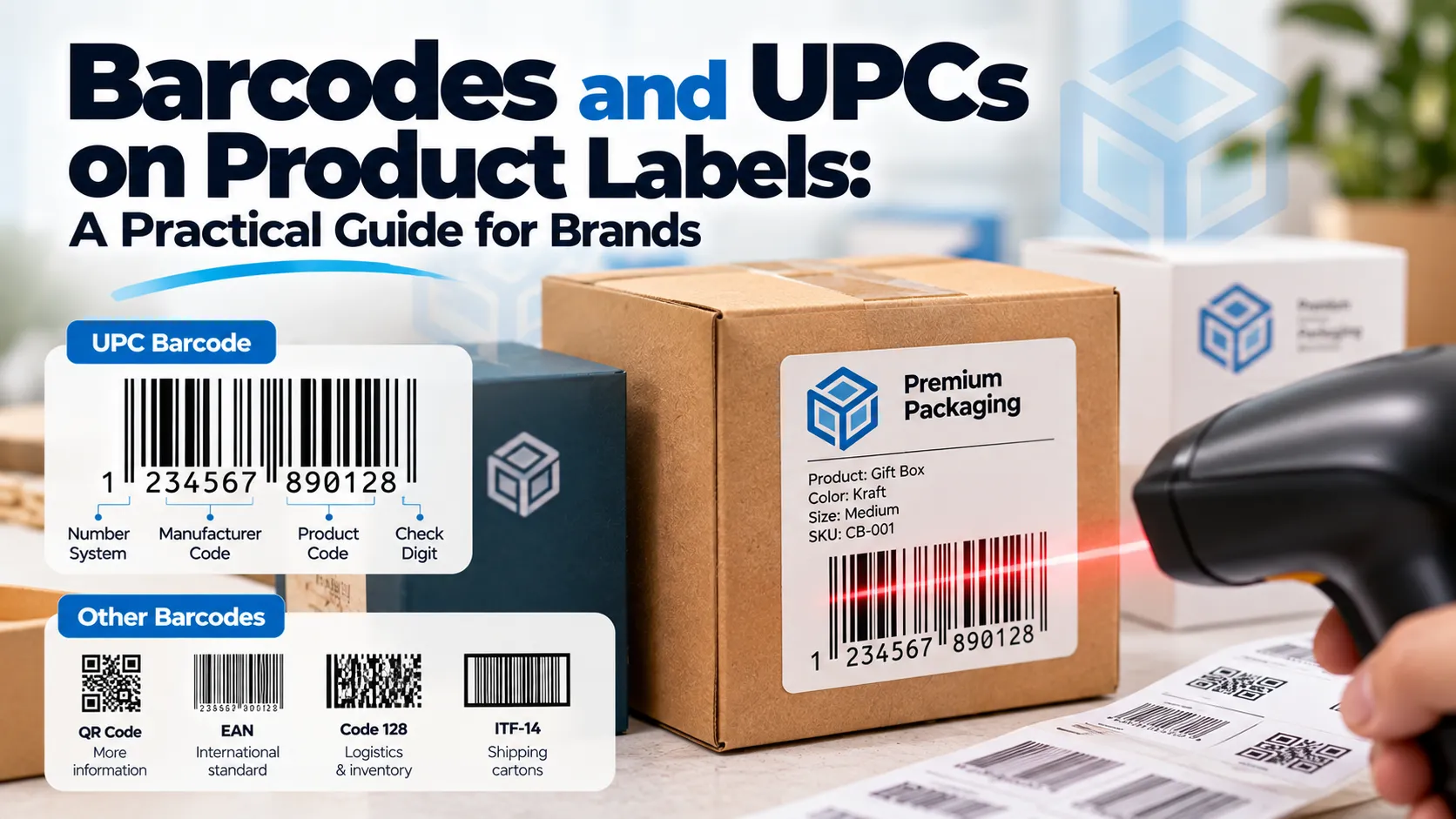
A UPC barcode is the 12-digit code that identifies your product at checkout and in retailer systems. To put one on your product labels, you license a company prefix or single GTIN from GS1 (the official issuer), assign a number to each product variant, then print the barcode on the label or box at the right size, in dark bars on a light background, in a flat spot away from folds and edges.
Most of the problems we see with barcodes on packaging come down to the last part: barcodes that are too small, printed in the wrong color, or wrapped around a curve. Here’s how to get each piece right.
UPC, EAN and GTIN: what’s the difference?
These terms get used interchangeably, but they aren’t quite the same thing.
- GTIN (Global Trade Item Number) is the number itself. It’s what identifies your product.
- UPC-A is the 12-digit barcode format used mainly in the US and Canada.
- EAN-13 is the 13-digit format used in most other countries. Scanners in US stores read both.
- The barcode is just the machine-readable picture of the number.
So when someone says “I need a UPC for my product,” what they really need is a GTIN, printed as a UPC-A barcode.
| Format | Digits | Where it’s used | Typical use |
|---|---|---|---|
| UPC-A | 12 | US and Canada | Retail products |
| EAN-13 | 13 | Europe, Asia and most other markets | Retail products |
| UPC-E | 8 | US and Canada | Very small packages |
| GS1-128 | Varies | Worldwide | Shipping cartons and pallets, not retail checkout |
Where to get UPC numbers
The legitimate source is GS1, the non-profit that manages the global barcode system. In the US that’s GS1 US. You can either license a company prefix (which lets you create a block of numbers) or, if you only have a handful of products, buy individual GTINs.
You’ll see cheap UPCs for sale on resale websites. They can work at a farmers market, but they often trace back to another company in the GS1 database. Big retailers and marketplaces, including Amazon, check numbers against GS1 records, and products with mismatched barcodes can be rejected or delisted. If you plan to sell anywhere beyond your own store, get your numbers from GS1.
How many barcodes do you need?
One GTIN per sellable variant. If you sell a candle in three scents and two sizes, that’s six products and six barcodes. A multipack (for example, a box of six candles sold as one item) needs its own number too.
A change in the label design doesn’t need a new barcode. A change in what’s inside the package (size, flavor, count) does.
Barcode size on labels and boxes
The standard UPC-A barcode at 100% size measures about 1.469 inches wide by 1.02 inches tall. GS1 allows it to be scaled between 80% and 200% of that size.
| Scale | Approximate size (W x H) | Good for |
|---|---|---|
| 80% (minimum) | 1.17 x 0.82 in | Small labels and cartons |
| 100% (nominal) | 1.47 x 1.02 in | Most product labels and boxes |
| 150% | 2.20 x 1.53 in | Large boxes and items scanned from a distance |
Two rules matter just as much as the scale:
- Don’t cut the height down to squeeze it in. A “truncated” barcode is harder to scan from different angles, and some retailers reject it.
- Leave a quiet zone. That’s a blank margin on both sides of the bars, roughly 1/8 inch at 100% size. Text, borders or design elements in that zone stop the barcode from scanning.
If your packaging is too small for an 80% UPC-A, ask about a UPC-E code, which is shorter. Not every number can be converted, so check before you design.
Barcode colors that scan (and ones that don’t)
Scanners read the contrast between the bars and the spaces, using red light. That leads to a few simple rules:
- Black bars on a white background is the safest choice.
- Dark blue, dark green and dark brown bars usually scan well on white.
- Red, orange, yellow and pink bars don’t scan. To a red-light scanner they look the same as a white background.
- The background can be white, yellow, orange or red-ish, but never dark.
- On kraft or brown packaging, print a white rectangle behind the barcode. The natural brown color lowers contrast too much.
- Avoid metallic foils, holographic finishes and spot gloss on the barcode itself.
Where to put the barcode
GS1 recommends placing the barcode on the back of the package, in the lower right area of the back panel. A few practical points:
- Keep it clear of folds, seams, flaps and the edges of the label. About 1/4 inch from any edge is a good minimum.
- On a curved surface like a bottle or jar, turn the barcode so the bars run horizontally (like a ladder). A barcode with vertical bars wrapped around a tight curve can’t be read at the ends.
- On a box, keep it on one panel. Never let it wrap around a corner.
- Don’t place it under a shrink band, a hang tag or a seal sticker.
Printing barcodes on packaging
Whether the barcode goes on a sticker or straight onto a printed box, the print has to be clean.
- Send the barcode as vector artwork (EPS, PDF or SVG), not a screenshot. A pixelated barcode will blur when printed.
- Don’t stretch or resize it out of proportion. Scale it evenly.
- Choose a matte or uncoated finish around the barcode area if you can. Gloss lamination can reflect scanner light.
- On flexible packaging like pouches, place it where the bag lies flat.
- Test before the full run. A simple scanner app catches obvious problems, and a barcode verifier gives a proper quality grade if your retailer requires one.
When we prepare your personalized product stickers or printed boxes, we check barcode size and quiet zones on the digital proof before printing. If you’re also choosing a sticker size, our circle sticker sizes guide can help, though for barcodes a rectangular label usually works better than a round one.
Labels vs printing the barcode on the box
If you sell many variants in the same box, a blank or generic box plus a barcode sticker per variant keeps your packaging costs down. If you sell one product in high volume, printing the barcode straight onto a custom printed box looks cleaner and removes a labeling step.
What about QR codes?
QR codes are becoming part of retail packaging. GS1 is working with retailers on a move towards 2D barcodes (a program it calls Sunrise 2027), which would let a single code carry product data and a web link. For now, keep the standard UPC barcode on your packaging and add a QR code separately if you want to link customers to instructions, reviews or a reorder page.
Frequently asked questions
You need one to sell through most retailers, distributors and big marketplaces. If you only sell through your own website or at events, it’s optional, though it’s still useful for inventory.
At 100% size, plan for about 1.5 x 1 inch plus a blank margin on each side. The smallest standard size is around 1.17 x 0.82 inches.
Yes, as long as the bars are dark (black, dark blue, dark green or dark brown) and the background is light. Red bars won’t scan.
You can, but it’s not ideal. A rectangular label gives the barcode a flat, clear area and makes the quiet zones easier to keep.
No. The barcode identifies the product, not the artwork. You only need a new GTIN when the product itself changes, such as a new size, flavor or pack count.